
DAILY CLOCK-IN/OUT SCHEDULE
STEPS:
- Read jobs for the day -client profile, notes, checklist (PREFERABLY TWICE)
- Leave home by 8am (leave 15 minutes earlier for storage stop or gas stop)
- Arrive at job by 8:25am
- Text “here” to office
- Clock in to “main” clock-in feature
1.Click “Clock-in” at beginning of first job
2.Click “Clock-out” when DONE for the day
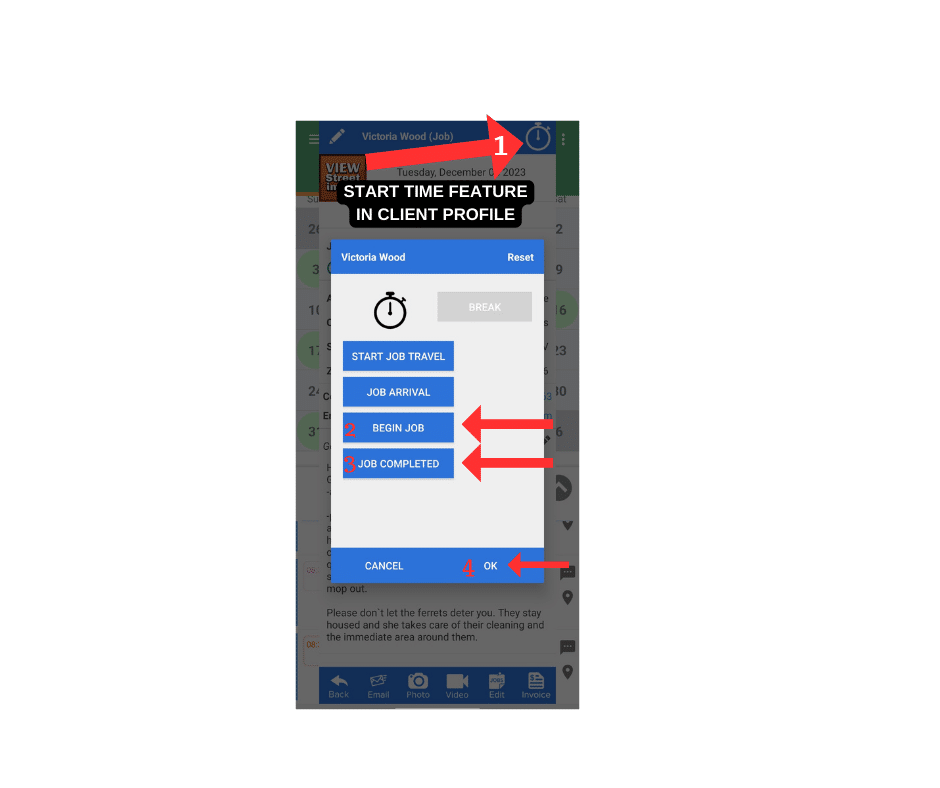
- Click “Begin Job” clock-in/out feature in client profile
- 1. Click “clock” icon
- 2.Click “begin job”
- 3.Click “Job Complete” – send client text
4.Click “OK” to close out
- Start job
- End job -check off “Checklist”
- Put equipment in car
- Get in car
- Text “done” to office
- Text “tip” & amount -if any
- Click “job completed” clock-in/out feature in client profile
- Send “job completed” to client (with all names of persons cleaning job)
* if you have second job, please follow steps 6-13
- Clock out with main “clock-in/out” feature at the end of your LAST job
- Done for the day -THANK YOU!!
The Customer Factor App for Employees
- Must download onto personal cell phone (The Customer Factor app)
- Must allow app to use location while using app
- Clock in on BIG clock, stay clocked in and clock out at the end of your day (last job) -this is not for you to go by, this time is for the office. You need to concentrate on the JTH
- Clock in/out at each clients house (in client profile) Clock icon
-Each house only select “Begin Job” then “Job Completed” when finished -send “Job Complete” text to client
- Take client home photos with app -it allows it to store directly in client profile (only when directed)
- Use client checklist and mark “complete
- Please add additional details of job in “notes”
You may look ahead to see all of your schedule
- You may look ahead to see where you have an open spot to make a personal appointment -must be one week in advance and after 3pm
- Please use “Task” for personal appointments -management will see this on office computer
You will only see client’s name and address -no phone number or email addresses
- Home details
- Square Footage of home
- How many bedrooms
- How many bathrooms
- Pets (sometimes)
- Dirt code of home
- Type of cleaning
- General notes -some details about job (that aren’t in checklist)
- Jobs
- Duration (time allowed to be there)
- Type of job (weekly, biweekly, maintenance, one-time)
DO NOT FORGET TO CLOCK OUT AT END OF DAY
Take job photos of client’s homes
- Click on client profile
- Click on camera icon
- Click “take photo”
- Take photo
- Click “OK’
Posted in team-portal
